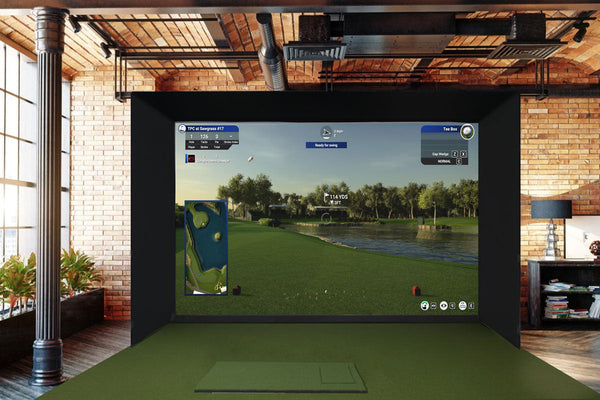
BenQ AK900ST vs AK800ST: Which One Fits Your Simulator Room
The AK800ST is the better buy for most home sim rooms, and the AK900ST earns its price in deep, bright or commercial rooms. Here is where each one actually hangs on your ceiling, with real throw distances and the mount details other guides skip.

For most home sim rooms, we would buy the BenQ AK800ST. It costs $3,999, which is $2,000 less than the AK900ST, it hangs in the exact same spot as the AK700ST we already sell the most of, and it is bright enough for a garage. The AK900ST is the better projector, but most of what the extra $2,000 buys is lens shift, motorized zoom and 1,000 more lumens, and it has to hang farther back in the room.
BenQ announced both on October 1, 2026. Every launch story so far repeats the spec sheet. None of them tell you where the projector ends up on your ceiling, how close it sits to your head and your launch monitor, or how your ceiling height changes all of it. That is what this guide is for.
What is the difference between the AK900ST and AK800ST?
Both are true 4K laser projectors made for golf, and they share more than the price gap suggests. Here is where they split.
| AK700ST | AK800ST | AK900ST | |
|---|---|---|---|
| Our price | $2,899 | $3,999 | $5,999 |
| Brightness | 4,000 lumens | 5,000 lumens | 6,000 lumens |
| Throw ratio | 0.69 to 0.83 | 0.69 to 0.83 | 0.81 to 0.89 |
| Zoom | 1.2x | 1.2x | 1.1x, motorized |
| Lens shift | None, fixed offset | None, fixed 102.5% offset | 60% vertical, 23% horizontal |
| Input lag at 4K 60Hz | 33.4 ms | 18.1 ms | 18.1 ms |
| Power draw, typical | Not listed | 285 watts | 348 watts |
| Built in audio | Not listed | 10 W speaker | 10 W speaker plus 10 W woofer |
| Weight | 7.5 lb | 13 lb | 22.5 lb |
Specs are from BenQ's published spec sheets and product pages. Prices are ours as of this writing.
The row that matters most for your room is the throw ratio. The AK800ST shares its throw ratio, zoom and offset with the AK700ST. If your room already works for an AK700ST, it works for an AK800ST, mounted in the same place. The AK900ST is a different story.
What you get with either one
Past brightness and the lens, the two share almost everything BenQ added this year. Both have:
- Golf Mode 2.0. An AI video processing chip tunes color and texture on every frame, so fairway mowing patterns and the grain on the green look like the real course.
- 97% of Rec. 709 color and 3,000,000:1 contrast. The pin stays visible from the tee box, and grass looks like grass instead of a flat green.
- Auto Screen Fit 2.0 with Smart Warping. A built in camera reads your impact screen's shape, size and curve and fits a distortion free picture to it in seconds. Smart Warping adds control points to make curved screens easier to fine tune.
- Ambient light adjustment. The same camera watches the room light and adjusts color and saturation to match.
- Golf Scene Memory. Up to five saved setups covering picture mode, screen fill, zoom, focus, geometry, audio and input. Switching from golf to a movie or a game is one button.
- Motorized autofocus from the remote, so you are not on a ladder to sharpen the picture.
- A sealed, dust proof IP5X laser engine rated for 24/7 use. No filters to clean, no bulbs to replace, and 20,000 hours in normal mode. That matters in a dusty garage and in a commercial bay.
So the choice between them is not about picture features. It is about brightness, how the lens lets you mount it, and where it fits in your room.
How far back does the projector go?
Start with your ceiling, not your screen width. Your ceiling sets how tall your screen can be, and the projector has to sit far enough back to fill that height. A 16:9 projector that fills the height makes a picture 16/9 as wide. Multiply that width by the throw ratio, and that is the distance from the lens to the screen.
| Picture height | Picture width at 16:9 | AK700ST or AK800ST, lens to screen | AK900ST, lens to screen |
|---|---|---|---|
| 8 ft | 14 ft 3 in | 9 ft 10 in to 11 ft 10 in | 11 ft 6 in to 12 ft 8 in |
| 8 ft 6 in | 15 ft 1 in | 10 ft 5 in to 12 ft 7 in | 12 ft 3 in to 13 ft 5 in |
| 9 ft | 16 ft | 11 ft to 13 ft 3 in | 13 ft to 14 ft 3 in |
| 9 ft 6 in | 16 ft 11 in | 11 ft 8 in to 14 ft | 13 ft 8 in to 15 ft |
| 10 ft | 17 ft 9 in | 12 ft 3 in to 14 ft 9 in | 14 ft 5 in to 15 ft 10 in |
Your picture height is your screen height, which is usually a little under your ceiling height. Find your row, and that is your mounting range.
If the picture is wider than your screen
Most screens are narrower than the 16:9 width in that table, and that is fine. In the NVIDIA Control Panel on your sim PC, set a custom resolution that brings the width in so the picture fits your screen edge to edge. The height stays the same, so the projector stays in the same spot. On our retractable screen, the side panels are inset 6 in on each side, so a 15 ft screen shows a 14 ft wide picture. Set the custom width to match that.
Notice the AK900ST range is farther back. With a 9 ft tall picture, the AK900ST needs at least 13 ft of throw. The AK800ST can do it from 11 ft. In a shorter room, that difference decides the purchase for you.
What most guides leave out: where the projector actually hangs
Spec sheets tell you distance. They do not tell you what else is on that part of the ceiling. In a sim room, three things fight for the same few feet: the golfer, the launch monitor, and the projector.
Your hitting spot sets everything
We place the hitting spot 9 to 11 ft from the screen, and never closer than 8 ft. Look at the table again. For an 8 to 9 ft tall picture, the AK800ST lens lands anywhere from about 9 ft 10 in to 13 ft 3 in from the screen. That is right over or just behind the hitting spot. Pick a spot in the zoom range that keeps the projector out of your swing, and check it with a driver before anything gets bolted to the ceiling.
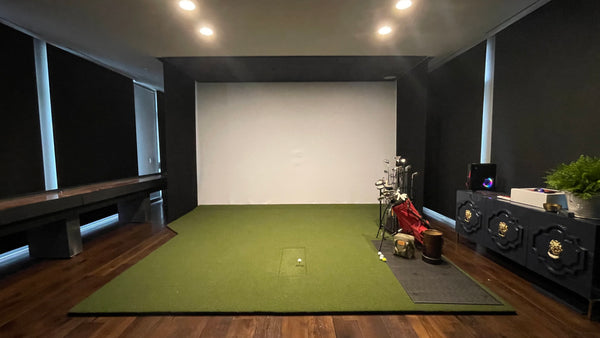
Here is a real layout from our Simulator Builder this month. The room was 13 ft 8 in wide with an 11 ft ceiling and a built in screen 10 ft tall. The golfer stood 10 ft from the screen. The ProTee VX sat 6 ft 5 in from the screen, in front of the golfer. The AK800ST hung 13 ft 6 in from the screen, behind the golfer, on a 1 ft drop. That lands inside the 10 ft row of the table. It is also the order you want: launch monitor in front of you, projector behind you.
Square screens work the same way
If your screen is close to square, the height still decides the mount spot. A customer asked us this month whether an AK700ST would fill an 8 by 8 ft screen. Our answer was to mount it 11 ft from lens to screen, which falls in the 8 ft row above. Then bring the width in with a custom resolution in the NVIDIA Control Panel, or use the projector's Screen Fill modes like 4:3, 5:4 and 1:1. Neither one changes how far back the projector hangs.
Fixed offset means you may need a drop
The AK700ST and AK800ST have no lens shift. The AK800ST spec sheet lists a fixed 102.5% offset. In plain terms, the lens needs to sit about level with the top of the picture. If your ceiling is higher than your screen, the projector hangs down on an extension. Our builder's rule is to use a JR3 mount extension so the projector sits level with the top of the screen. In the layout above, that was a 1 ft drop. You may see lens shift mentioned on the AK800ST product page, but that copy describes the AK900ST.
The AK900ST has real 4 way lens shift: 60% up or down and 23% side to side, with no loss of 4K sharpness. That lets you mount it higher, lower or a bit off center, and move the picture with the lens instead of tilting the projector or using digital keystone. If you have a beam, a light, or an HVAC duct right where the projector wants to go, that flexibility is worth money.
Garages add one more problem
In a garage, the open door and its tracks take up the ceiling near the front of the room. We mount the retractable screen below the tracks with angle iron. The projector also has to clear the door when it is open, and with a JR3 mount it needs about 10 in of clearance between the open door and the ceiling. If you do not have that, you have two options: lower the garage door tracks, or pick a shorter throw projector that can hang in front of where the door rests. Measure where your door sits when it is fully open before you pick a projector or a mount spot.
Weight and size
The AK900ST weighs 22.5 lb and is about 20.5 in wide. The AK800ST is 13 lb. The Crimson JR3 mount we use handles both, with or without a drop extension, so you do not need a different mount for the bigger unit. Just make sure it is anchored into a ceiling joist or blocking, not drywall alone.
Do I need 5,000 or 6,000 lumens?
More lumens help when there is light you cannot control: a garage with windows, a door you leave open, or a commercial bay with overhead lights on all day. Both models adjust color to the room light, but that does not replace raw brightness. In a closed room you control, the AK700ST at 4,000 lumens is still our best seller, and the AK800ST already gives you 1,000 more. We would spend the extra $2,000 on the AK900ST for a bright room or a business, not for a dark bonus room.
Both new models also cut input lag to 18.1 ms at 4K 60Hz, down from 33.4 ms on the AK700ST. If you also plan to game on the screen, that is a real upgrade.
Which one should you buy?
AK800ST
$3,999
Your room is shorter, the projector can sit on the center line, and you want the new picture features with more brightness than the AK700ST. This is the one we expect most home builds to land on.
Shop the AK800STAK900ST
$5,999
Your room is deep, the projector cannot sit where the AK800ST needs it, the room gets a lot of daylight, or you are building a commercial bay with the lights on.
Shop the AK900STAK700ST
$2,899
Your room is dark and the budget is tight. It hangs in the same spot as the AK800ST and costs $1,100 less.
Shop the AK700STWhen we would tell you to skip both
Your whole sim budget is around $5K. A $4,000 or $6,000 projector does not fit. The BenQ AH30ST at $1,499 or the TH671ST at $949 will put a good picture on the screen and leave money for the launch monitor, screen and turf. You can always upgrade the projector later.
You already own an AK700ST in a dark room. The AK800ST will not change where anything hangs. The upgrade is picture quality, brightness and lower input lag. For golf alone, most people will not feel that difference enough to justify $3,999.
What you need besides the projector
- HDMI cable not includedAny 4K capable HDMI cable at the length you need works.
- Ceiling outlet at the projector spotHave your electrician add it before the ceiling is finished.
- HDMI run from the PCOur layouts show a conduit box beside each outlet so the cable runs stay clean.
- A ceiling mountThe Crimson JR3 fits both, with or without an extension column.
Buy a projector with a launch monitor and save 5% on the projector:
AK800ST $3,799.05
AK900ST $5,699.05
FAQ
How far back would the projector go from the screen?
Start with your picture height, which is about your screen height. For a 9 ft tall picture, the AK800ST goes 11 ft to 13 ft 3 in from the screen, and the AK900ST goes 13 ft to 14 ft 3 in. A taller picture moves it farther back.
What if the picture is wider than my screen?
Set a custom resolution in the NVIDIA Control Panel on your sim PC to bring the width in until it fits your screen perfectly. The projector stays where it is.
Does the AK800ST have lens shift?
No. BenQ's spec sheet lists a fixed 102.5% offset for the AK800ST, so the lens should sit about level with the top of the picture. Only the AK900ST has lens shift.
Will it fill my screen without a bunch of unused screen?
Yes, if it is mounted at the right distance and height. Fill the height from the right mount spot, then trim the width with a custom resolution or the projector's Screen Fill modes for 4:3, 5:4, 3:2 and 1:1 screens. Send us your screen size and we will tell you the exact mount spot.
Does it work on a curved screen?
Yes. Both read the screen's curve with the built in camera, and both have Smart Warping for fine tuning.
Can I use the projector's speakers?
Sound will come out of the projector once everything is connected, but it is not the best quality. We recommend a separate system. A Sonos setup works great.
Does the projector work with the ProTee VX on the ceiling too?
Yes. The ProTee VX sits in front of the hitting spot and the projector sits behind it. The ProTee VX needs power and Cat6 to the PC. The projector needs power and HDMI. Plan both outlets at the same time.
Do I need a drop extension?
With the AK800ST or AK700ST, if your ceiling is higher than the top of your screen, probably yes. The lens should sit about level with the top of the picture. The AK900ST's lens shift gives you more room to skip it.
What mount do I need?
The Crimson JR3 works for both the AK800ST and AK900ST, with or without an extension column.
Will it fit in my garage with the door open?
With a JR3 mount, plan on about 10 in of clearance between the open door and the ceiling where the projector hangs. Without that, lower the door tracks or choose a shorter throw projector.
Can either one run all day in a commercial bay?
Yes. BenQ rates both laser engines for 24/7 use, sealed against dust with no filters to clean. For a bay with the lights on, the AK900ST's extra brightness is the reason to step up.
Not sure which one fits your room? Send photos and measurements of your space to hello@gunghogolf.com or text (512) 222 2220. You can also lay out your room in Design Your Simulator and see where the projector goes. Shop the AK800ST, the AK900ST, or the AK700ST.
Planning a simulator?
Build your setup online, or book a 30 minute call with our team.